Wednesday, July 6, 2011

Google Maps 5.7 for Android introduces Transit Navigation (Beta) and more

(Cross-posted on the Google Lat Long Blog and the Google Mobile Blog)

Today we’re releasing Google Maps 5.7 for Android. From Bangkok to Baltimore, we’ve added Transit Navigation (Beta), updated access to directions, better suggested search results and a photo viewer to Place pages—all of which can help you whether you’re traveling to an unfamiliar part of town or visiting a city across the world.

Transit Navigation (Beta)
Google Maps Navigation (Beta) currently provides over 12 billion miles of GPS-guided driving and walking directions per year. Now, GPS turn-by-turn (or in this case, stop-by-stop) navigation is available for public transit directions in 400+ cities around the globe with Transit Navigation.


Transit Navigation uses GPS to determine your current location along your route and alerts you when it’s time to get off or make a transfer. This is particularly helpful if you’re in a city where you don’t speak the language and can’t read the route maps or understand the announcements. After starting your trip with Transit Navigation, you can open another application or put your phone away entirely and Google Maps will still display an alert in your notification bar and vibrate your phone when your stop is coming up.
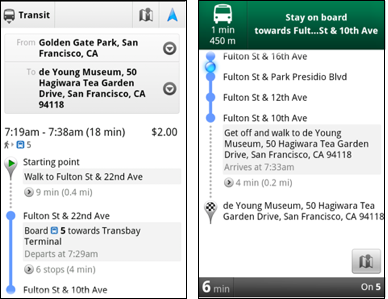

Left: Transit directions without Navigation. Right: with Navigation


Navigation alerts appear even if you switch to another app

Now you can spend more time enjoying the sights out the window and less time worrying about how many stops are left, where you are along the route or whether you missed your stop. Since Transit Navigation relies on GPS signals, we recommend using this feature for above-ground transit.

Updated Directions
Now that we’ve improved our directions services, we wanted them to be incredibly easy to pull up on your screen. If you select the driving or walking icon and your route is supported by Google Maps Navigation, the Navigation icon will automatically appear so you can get access to step-by-step directions in one click. Note: this change is currently only in place for driving and walking and does not appear for public transit.


One-click access to Navigation from directions

We’ve also streamlined how you access directions from within a Place page. Before, clicking directions in a Place page would bring up options for “Driving Navigation,” “Walking Navigation” and “Directions.” Now, you’ll be taken straight to the map and see the new directions box shown above.

Improved Search Suggest
We’ve made two changes to search suggestions that improve their quality and speed. First, we’ve added category icons, so instead of all search suggestions displaying the same icon, the icon next to the listing will reflect the type of result. You’ll see a pin for a Google Places listing, a star for a starred Place or location, a clock for a previously used search term, a person for contacts and a magnifying glass for “anything else.”


Two examples of search suggest with new icons

Also, any place you got directions to or called directly from its Places page will be included as a suggestion for a relevant search. For example, if you recently received directions to the U.S. Post Office on Wilshire Boulevard, afterward, when you begin a search with [p] or [bou], that U.S. Post Office would appear as a search suggestion.

Photo viewer for Place pages
Since we released business photos for Place pages last October, millions of photos have been added to Place pages around the world. To enable you to view these photos on the run, a slick new photo viewer has been added so you can browse photos while deciding where to go.


Left: Business photos in Place pages. Right: New photo viewer

To start using Google Maps 5.7 for Android, download the update here. This update requires an Android OS 2.1+ device and works anywhere Google Maps is currently available. Learn more at our help center and have fun exploring, whether it be by car, transit, bike or foot.

Thursday, June 30, 2011

GoogleServe 2011: Giving back around the world

Over the last month, more than 7,700 Googlers helped serve their communities across 400 different projects as part of GoogleServe, an employee-driven initiative organized almost entirely by volunteers. Through partnerships with nonprofits, schools and local governments, Googlers from 119 cities in 36 countries helped communities in need with projects ranging from educating youth about online bullying to cleaning up local rivers and parks.

GoogleServe began in 2008 and has become an annual company tradition. Giving back to our communities not only revitalizes and strengthens our connections with the cities and towns in which we live and work, it also brings us closer together as a global team. Each year the event has grown in size and scope and this year’s GoogleServe was our largest yet. Here’s a sampling of some of the projects we participated in this time around:
While GoogleServe is an annual celebration of community service, employees donate both time and money to organizations and causes throughout the year. You can find opportunities to serve your local community at All For Good.

Here are some photos of our team in action:


Tuesday, June 28, 2011

Evolving the Google design and experience

Starting today, you might begin noticing that things look a little different across Google products. We’re working on a project to bring you a new and improved Google experience, and over the next few months, you’ll continue to see more updates to our look and feel. Even our classic homepage is getting a bit of a makeover:


New Google homepage with a smaller logo and links moved to the top and bottom edges of the browser for a cleaner look

The way people use and experience the web is evolving, and our goal is to give you a more seamless and consistent online experience—one that works no matter which Google product you’re using or what device you’re using it on. The new Google experience that we’ve begun working toward is founded on three key design principles: focus, elasticity and effortlessness.
  • Focus: Whether you’re searching, emailing or looking for a map, the only thing you should be concerned about is getting what you want. Our job is to provide the tools and features that will get you there quickly and easily. With the design changes in the coming weeks and months, we’re bringing forward the stuff that matters to you and getting all the other clutter out of your way. Even simple changes, like using bolder colors for actionable buttons or hiding navigation buttons until they’re actually needed, can help you better focus on only what you need at the moment.
  • Elasticity: In the early days, there was pretty much just one way to use Google: on a desktop computer with an average-sized monitor. Over a decade later, all it takes is a look around one’s home or office at the various mobile devices, tablets, high-resolution monitors and TVs to see a plethora of ways to access the web. The new design will soon allow you to seamlessly transition from one device to another and have a consistent visual experience. We aim to bring you this flexibility without sacrificing style or usefulness.
  • Effortlessness: Our design philosophy is to combine power with simplicity. We want to keep our look simple and clean, but behind the seemingly simple design, use new technologies like HTML5, WebGL and the latest, fastest browsers to make sure you have all the power of the web behind you.
Constant revision and improvement is part of our overarching philosophy. For example, last year we introduced an updated look and feel to our search results, and if you compare the original Google homepage to today’s version, you’ll see that a makeover every so often can certainly be refreshing:


Original Google homepage in 1997

Starting today and over the course of the next few months, look for a series of design improvements across all our products, including Google Search, Google Maps and Gmail.

Introducing the Google+ project: Real-life sharing, rethought for the web

Update: For our international readers, this post is also available in French, German, Italian, Japanese, Portuguese, Russian and Spanish. - Ed.

Among the most basic of human needs is the need to connect with others. With a smile, a laugh, a whisper or a cheer, we connect with others every single day.

Today, the connections between people increasingly happen online. Yet the subtlety and substance of real-world interactions are lost in the rigidness of our online tools.

In this basic, human way, online sharing is awkward. Even broken. And we aim to fix it.

We’d like to bring the nuance and richness of real-life sharing to software. We want to make Google better by including you, your relationships, and your interests. And so begins the Google+ project:


+Circles: share what matters, with the people who matter most
Not all relationships are created equal. So in life we share one thing with college buddies, another with parents, and almost nothing with our boss. The problem is that today’s online services turn friendship into fast food—wrapping everyone in “friend” paper—and sharing really suffers:
  • It’s sloppy. We only want to connect with certain people at certain times, but online we hear from everyone all the time.
  • It’s scary. Every online conversation (with over 100 “friends”) is a public performance, so we often share less because of stage fright.
  • It’s insensitive. We all define “friend” and “family” differently—in our own way, on our own terms—but we lose this nuance online.
In light of these shortcomings we asked ourselves, “What do people actually do?” And we didn’t have to search far for the answer. People in fact share selectively all the time—with their circles.

From close family to foodies, we found that people already use real-life circles to express themselves, and to share with precisely the right folks. So we did the only thing that made sense: we brought Circles to software. Just make a circle, add your people, and share what’s new—just like any other day:


+Sparks: strike up a conversation, about pretty much anything
Healthy obsessions inspire sharing, and we’ve all got one (or two, or three...). Maybe it’s muscle cars, or comic books, or fashion, but the attraction is always the same: it comes up in conversation, we immediately jump in, and we share back and forth with other fans. Often for hours. The trick is getting things started, and getting over that initial hump. Fortunately, the web is the ultimate icebreaker.

The web, of course, is filled with great content—from timely articles to vibrant photos to funny videos. And great content can lead to great conversations. We noticed, however, that it’s still too hard to find and share the things we care about—not without lots of work, and lots of noise. So, we built an online sharing engine called Sparks.

Thanks to Google’s web expertise, Sparks delivers a feed of highly contagious content from across the Internet. On any topic you want, in over 40 languages. Simply add your interests, and you’ll always have something to watch, read and share—with just the right circle of friends:


+Hangouts: stop by and say hello, face-to-face-to-face
Whether it's inside a pub or on a front porch, human beings have always enjoyed hanging out. And why not? It's how we unwind, recharge, and spend unscheduled time with old and new friends alike. Hanging out is deceptively simple though, and the nuance gets lost online.

Just think: when you walk into the pub or step onto your front porch, you're in fact signaling to everyone around, “Hey, I've got some time, so feel free to stop by." Further, it’s this unspoken understanding that puts people at ease, and encourages conversation. But today’s online communication tools (like instant messaging and video-calling) don’t understand this subtlety:
  • They’re annoying, for starters. You can ping everyone that’s “available,” but you’re bound to interrupt someone’s plans.
  • They’re also really awkward. When someone doesn't respond, you don't know if they’re just not there, or just not interested.
With Google+ we wanted to make on-screen gatherings fun, fluid and serendipitous, so we created Hangouts. By combining the casual meetup with live multi-person video, Hangouts lets you stop by when you're free, and spend time with your Circles. Face-to-face-to-face:


+Mobile: share what’s around, right now, without any hassle
These days a phone is the perfect sharing accessory: it's always with you, it's always online, and it's how we stay close with our closest friends. We didn’t want “just” a mobile experience, however, so with Google+ we focused on things (like GPS, cameras, and messaging) to make your pocket computer even more personal.

+Location, location, location
In life, the places we visit shape conversations in lots of meaningful ways. If we call John from the airport, he’ll likely ask about our trip. Or if Jane texts from a nearby restaurant, we might join her for dessert. With Google+ you can add your location to every post. (Or not. It’s always up to you.)

+Instant Upload
Getting photos off your phone is a huge pain, so most of us don't even bother. Of course pictures are meant to be shared, not stranded, so we created Instant Upload to help you never leave a photo behind. While you're snapping pictures, and with your permission, Google+ adds your photos to a private album in the cloud. This way they're always available across your devices—ready to share as you see fit.


+Messenger
Coordinating with friends and family in real-time is really hard in real life. After all, everyone's on different schedules, in different places, and plans can change at any moment. Phone calls and text messages can work in a pinch, but they're not quite right for getting the gang together. So Google+ includes Messenger, a group messaging experience that lets everyone inside the circle know what's going on, right this second.


Starting today Google+ is available on Android Market and the mobile web, and it’s coming soon to the App Store.

+You: putting you first, all across Google
That’s the Google+ project so far: Circles, Sparks, Hangouts and mobile. We’re beginning in Field Trial, so you may find some rough edges, and the project is by invitation only. But online sharing needs a serious re-think, so it’s time we got started. There’s just one more thing—really the only thing: You.

You and over a billion others trust Google, and we don’t take this lightly. In fact we’ve focused on the user for over a decade: liberating data, working for an open Internet, and respecting people’s freedom to be who they want to be. We realize, however, that Google+ is a different kind of project, requiring a different kind of focus—on you. That’s why we’re giving you more ways to stay private or go public; more meaningful choices around your friends and your data; and more ways to let us know how we’re doing. All across Google.

When your invite arrives we hope you’ll join the project. But it’s entirely up to +You.

Update Sept 20: Made changes to reflect the new name for group messaging (Messenger).

Celebrating Pride 2011

More than a thousand Googlers participated in Pride celebrations in a dozen cities to support equality and remember the sacrifices of those who have made life better for members of the LGBT* community today. While we celebrated the legalization of marriage equality in New York, the state where the gay rights movement in the United States began more than 40 years ago, our participation was especially global this year: we were at Mardi Gras in Sydney, Australia for the first time and supported Pink Dot in Singapore. From San Francisco to Dublin to Tel Aviv to Boston, we stepped out in large numbers for Pride parades around the world in a colorful swirl of Gaygler and Android Pride t-shirts. As in years past, we featured a month-long easter egg in our search results worldwide to celebrate Pride, adding a rainbow next to the search box for a number of Pride-related queries including [lgbt], [marriage equality] and [pride 2011].

But it’s not just during Pride week that we celebrate and promote equality and diversity. We’ve partnered with various organizations and earlier this year employees contributed their stories to the It Gets Better project.

In addition to our external efforts, we’re also working from within. Recently, we extended domestic partner benefits in regions such as China and Hong Kong. Last year, Google adopted a policy promoting benefits equality through a gross-up on imputed taxes for health insurance. We provided the equivalent of the Family and Medical Leave Act for same-sex domestic partners and updated the definition of infertility. Happily, over the last year we’ve been approached by many organizations looking to do the same.

Gayglers around the globe created this video to increase awareness about the LGBT community at Google, and we're happy to share it with you today.


Posted by Cynthia Yeung, Strategic Partner Development Team

*LGBT stands for lesbian, gay, bisexual or transgender but, without letting the acronym get too unwieldy, is also intended to include people who identify as queer, asexual or intersex, amongst others.

Examining the impact of clean energy innovation

At Google, we’re committed to using technology to solve one of the greatest challenges we face as a country: building a clean energy future. That’s why we’ve worked hard to be carbon neutral as a company, launched our renewable energy cheaper than coal initiative and have invested in several clean energy companies and projects around the world.

But what if we knew the value of innovation in clean energy technologies? How much could new technologies contribute to our economic growth, enhance our energy security or reduce greenhouse gas (GHG) emissions? Robust data can help us understand these important questions, and the role innovation in clean energy could play in addressing our future economic, security and climate challenges.

Through Google.org, our energy team set out to answer some of these questions. Using McKinsey’s Low Carbon Economics Tool (LCET), we assessed the long-term economic impacts for the U.S. assuming breakthroughs were made in several different clean energy technologies, like wind, geothermal and electric vehicles. McKinsey’s LCET is a neutral, analytic set of interlinked models that estimates the potential economic and technology implications of various policy and technology assumptions.

The analysis is based on a model and includes assumptions and conclusions that Google.org developed, so it isn’t a prediction of the future. We’ve decided to make the analysis and associated data available everywhere because we believe it could provide a new perspective on the economic value of public and private investment in energy innovation. Here are just some of the most compelling findings:
  • Energy innovation pays off big: We compared “business as usual” (BAU) to scenarios with breakthroughs in clean energy technologies. On top of those, we layered a series of possible clean energy policies (more details in the report). We found that by 2030, when compared to BAU, breakthroughs could help the U.S.:
    • Grow GDP by over $155 billion/year ($244 billion in our Clean Policy scenario)
    • Create over 1.1 million new full-time jobs/year (1.9 million with Clean Policy)
    • Reduce household energy costs by over $942/year ($995 with Clean Policy)
    • Reduce U.S. oil consumption by over 1.1 billion barrels/year
    • Reduce U.S. total carbon emissions by 13% in 2030 (21% with Clean Policy)
  • Speed matters and delay is costly: Our model found a mere five year delay (2010-2015) in accelerating technology innovation led to $2.3-3.2 trillion in unrealized GDP, an aggregate 1.2-1.4 million net unrealized jobs and 8-28 more gigatons of potential GHG emissions by 2050.
  • Policy and innovation can enhance each other: Combining clean energy policies with technological breakthroughs increased the economic, security and pollution benefits for either innovation or policy alone. Take GHG emissions: the model showed that combining policy and innovation led to 59% GHG reductions by 2050 (vs. 2005 levels), while maintaining economic growth.
This analysis assumed that breakthroughs in clean energy happened and that policies were put in place, and then tried to understand the impact. The data here allows us to imagine a world in which the U.S. captures the potential benefits of some clean energy technologies: economic growth, job generation and a reduction in harmful emissions. We haven’t developed the roadmap, and getting there will take the right mix of policies, sustained investment in technological innovation by public and private institutions and mobilization of the private sector’s entrepreneurial energies. We hope this analysis encourages further discussion and debate on these important issues.

Monday, June 27, 2011

The J. Paul Getty Museum collection comes alive with Google Goggles

The Google Goggles team has worked with The J. Paul Getty Museum in Los Angeles to “Goggles-enable” their permanent collection of paintings. Now you can use the Google Goggles app on your phone to take a photo of any of the paintings in the Getty’s permanent collection and instantly access information about the work from both the Getty’s mobile-optimized webpage about the painting and from around the web. Instead of being limited to the amount of information that fits on the wall next to a painting, Getty museum staff can now share a fuller story that all visitors can enjoy online.

From your phone you can read and hear commentary from artists, curators, conservators or the works of art themselves, such as the anthropomorphic voice of the pig in the Adoration of the Magi. Snap a quick shot of the artwork and have an interactive experience with what is on the wall in front of you—all in in the palm of your hand (just remember to respect museum photography rules and to turn off your flash).


Google Goggles results and the Getty webpage for Portrait of the Sisters Bonaparte

If you want to take your art history lesson home with you, you can store a record of the art you captured by enabling Search History on your Android phone. In fact, anytime you stumble across a piece of art, whether it be a reproduction on a poster or a print in a book, you can take a photo with your phone and Goggles will recognize it and supply you with rich info.

Download Google Goggles for your Android or iOS device as part of the Google Search app, and give it a try if you stop by the Getty. You can also view the J. Paul Getty Museum collection online at http://www.getty.edu/art. For more information about the Getty-Goggles project, visit mobile.getty.edu/gettygoggles or scan the QR code below.


Posted by Shailesh Nalawadi, Product Manager